
The NREGA Job Card List 2026 helps rural households across India verify their inclusion under the Mahatma Gandhi National Rural Employment Guarantee Scheme (MGNREGS). This government scheme ensures up to 100 days of guaranteed wage employment every financial year to eligible rural families willing to do unskilled manual work.
A NREGA Job Card is issued as an official identity document to registered households, allowing them to demand work, track employment details, and receive wages directly. Through the online state-wise job card list, beneficiaries can easily check their name, job card number, and work details, and download the information without visiting government offices.
In this guide, we explain how beneficiaries can use the online NREGA portal to check and download their NREGA Job Card details from the comfort of their home. The Government of India provides this facility through the official MGNREGA website, allowing rural workers to access job-related information transparently without visiting government offices.
Details Available on NREGA Job Card
A NREGA Job Card includes the following important details:
- Job Card Number – A unique identification number assigned to the household
- Name of the Head of Household
- Name of Father or Husband
- Social Category (SC/ST/OBC/General)
- Date of Registration under NREGA
- Residential Address – Village, Gram Panchayat, Block, and District
- BPL Status – Whether the household belongs to the Below Poverty Line category
- Number of Days Work Demanded by the household
- Number of Days Work Allotted under the scheme
- Details of Allocated Work, along with the Muster Roll Number
- Measurement and Work Completion Details
- Unemployment Allowance, if applicable
- Dates and Total Number of Days Worked
- Date-wise Wages Paid to the beneficiary
- Delay Compensation, if any, paid due to late wage disbursement
These details ensure complete transparency, help beneficiaries monitor their employment history, and act as proof in case of disputes related to wages or work allocation.
State-Wise NREGA Job Card List 2026
The Government of India provides a state-wise NREGA Job Card List 2026 to help beneficiaries easily check their names, job card details, and employment records online. By selecting the respective state, rural households can access their job card information without visiting Gram Panchayat or block offices.
To view your name in the NREGA Job Card List 2026, simply click on the “View” option against your state and follow the on-screen instructions.
NREGA Job Card List 2026 – State-Wise Links
| State / UT | NREGA Job Card List 2026 |
|---|---|
| Andaman and Nicobar Islands | View |
| Andhra Pradesh | View |
| Arunachal Pradesh | View |
| Assam | View |
| Bihar | View |
| Chandigarh | View |
| Chhattisgarh | View |
| Dadra and Nagar Haveli | View |
| Daman and Diu | View |
| Goa | View |
| Gujarat | View |
| Haryana | View |
| Himachal Pradesh | View |
| Jammu & Kashmir | View |
| Jharkhand | View |
| Karnataka | View |
| Kerala | View |
| Ladakh | View |
| Lakshadweep | View |
| Madhya Pradesh | View |
| Maharashtra | View |
| Manipur | View |
| Meghalaya | View |
| Mizoram | View |
| Nagaland | View |
| Odisha | View |
| Puducherry | View |
| Punjab | View |
| Rajasthan | View |
| Sikkim | View |
| Tamil Nadu | View |
| Telangana | View |
| Tripura | View |
| Uttar Pradesh | View |
| Uttarakhand | View |
| West Bengal | View |
Note: After clicking on your state, you will need to select your district, block, Gram Panchayat, and financial year to access the complete NREGA Job Card list.
For accessing the full and updated list of all states and Union Territories, use the official NREGA portal.
How to Find Your Name in NREGA Job Card List 2026
To check your name in the NREGA Job Card List 2026, follow the simple steps given below using the official MGNREGA portal.
Step 1: Select Your State
From the table below, click on the “View” option against your respective state.
State-wise NREGA Job Card List 2026
| State / UT | NREGA Job Card List 2026 |
|---|---|
| Andaman and Nicobar Islands | View |
| Andhra Pradesh | View |
| Arunachal Pradesh | View |
| Assam | View |
| Bihar | View |
| Chandigarh | View |
| Chhattisgarh | View |
| Dadra and Nagar Haveli | View |
| Daman and Diu | View |
| Goa | View |
| Gujarat | View |
| Haryana | View |
| Himachal Pradesh | View |
| Jammu Kashmir and Ladakh | View |
| Jharkhand | View |
| Karnataka | View |
| Kerala | View |
| Ladakh | View |
| Lakshadweep | View |
| Madhya Pradesh | View |
| Maharashtra | View |
| Manipur | View |
| Meghalaya | View |
| Mizoram | View |
| Nagaland | View |
| Odisha | View |
| Puducherry | View |
| Punjab | View |
| Rajasthan | View |
| Sikkim | View |
| Tamil Nadu | View |
| Telangana | View |
| Tripura | View |
| Uttar Pradesh | View |
| Uttarakhand | View |
| West Bengal | View |
Step 2: Select Location Details
After clicking on View, you will be redirected to a new page.
Here, select the following details from the dropdown menus:
- Financial Year
- District
- Block
- Gram Panchayat
Then click on the “Proceed” button.
Step 3: View NREGA Job Card List
Once you proceed, the NREGA Job Card List 2026 will be displayed on the screen with the names of registered households.
Step 4: Find Your Name
Scroll down to check the complete list.
You can use Ctrl + F (Find option) to quickly search your name or job card number in the list.
Example: Andhra Pradesh NREGA Job Card List 2026
Step 1: Open the Official Link
Copy and paste the following link into your browser:
https://nregastrep.nic.in/netnrega/loginframegp.aspx?lflag=eng&page=C&state_code=02Step 2: Select Required Details
Choose:
- Financial Year
- District
- Mandal / Block
- Gram Panchayat / Zila Panchayat
Then click on Proceed.
Step 3: Click on Job Card Employment Register
On the next page, under Job Card / Registration, click on “Job Card Employment Register”.
Step 4: View & Download Job Card List
A list of NREGA job card holders in Andhra Pradesh will appear along with job card numbers.
Scroll down to find your name and click on the job card number to view or download details.
Note – The above process is same for all states and Union Territories. Only the state selection changes.
State-Wise NREGA Job Card List 2026 (Check Name Online)
Beneficiaries can check their name in the NREGA Job Card List 2026 through the official MGNREGA portal. The process is completely online and transparent. Only the state selection changes, while the remaining steps stay the same for all states.
How to Check NREGA Job Card List 2026 (General Steps)
Step 1: Open the Official State Page
Click on the official NREGA job card page for your state using the “Click here” option provided below.
Step 2: Select Location Details
Choose the following from the dropdown menus:
- Financial Year
- District
- Block
- Gram Panchayat
Then click on Proceed.
Step 3: Open Job Card Register
On the next page, click on Job Card / Employment Register.
Step 4: Find Your Name
The NREGA Job Card List 2026 will appear with job card numbers.
Scroll down or use Ctrl + F to search your name easily.
NREGA Job Card List 2026
The State-Wise NREGA Job Card List 2026 table is currently kept blank as the official data has not yet been released by the government. Once the updated state-wise job card lists for 2026 are published on the official NREGA portal, the table will be updated accordingly. Beneficiaries are advised to check back regularly for the latest updates.
Step 1: To check you name in Assam NREGA Job Card List 2026, click on the following link:
Step 2: A list of blocks with the district will appear. Select your block.
Step 3: A list of panchayats with the district will appear. Select your panchayat.
Step 4: On the new page, click on the Job Card/Employment Register option.
Step 5: A detailed list of the NREGA job card holders will appear on your screen; scroll down to find your name.
State-Wise NREGA Job Card List 2026
| State | Job Card List |
|---|---|
| Assam | Click here |
| Bihar | Click here |
| Chhattisgarh | Click here |
| Gujarat | Click here |
| Haryana | Click here |
| Jharkhand | Click here |
| Karnataka | Click here |
| Kerala | Click here |
| Madhya Pradesh | Click here |
| Maharashtra | Click here |
| Odisha | Click here |
| Punjab | Click here |
| Rajasthan | Click here |
| Sikkim | Click here |
| Tripura | Click here |
| Uttar Pradesh | Click here |
| Uttarakhand | Click here |
| West Bengal | Click here |
Note: After clicking “Click here”, the remaining steps are the same for all states.
How to Download NREGA Job Card in 2026
Step-by-Step Process
- Visit the official MGNREGA website – Click here
- Click on Generate Reports
- Select:
- State
- Financial Year
- District
- Block
- Panchayat
- Click Proceed
- Under R1 Job Card / Registration, select Job Card / Employment Register
- Click on your Job Card Number
- Your NREGA Job Card will open with complete work and wage details
- Download or print the job card if required
How to Apply for NREGA Job Card Online (2026)
Applicants can apply online using the UMANG App or UMANG Portal.
Steps to Apply Online
- Download the UMANG App or open the UMANG portal – Click here
- Register using your mobile number
- Log in using OTP
- Search for MGNREGA
- Open the MGNREGA service page
- Click on Apply for NREGA Job Card
- Fill in all mandatory details and submit the application
Final verification is done by the Gram Panchayat.
Important Tips
- Select the correct financial year
- Ensure Gram Panchayat details are accurate
- Use Ctrl + F to find your name faster
- Job card download is free
- No agent or middleman is required
How to Apply for NREGA Job Card Offline
The NREGA Job Card application process is mainly offline, as the employment scheme is designed specifically for rural households. Eligible applicants must visit their respective Gram Panchayat office to complete the registration process. However, the prescribed application form can also be downloaded for reference.
Step-by-Step Offline Application Process
Step 1: Visit your Gram Panchayat office.
Step 2: Request the NREGA Job Card registration form or fill the prescribed application form and submit it at the Gram Panchayat office.
Step 3: After verification of the submitted details by the Panchayat authorities, the NREGA Job Card will be issued to the applicant.
Details Needed to Apply for NREGA Job Card
Applicants are required to provide the following details while applying for a NREGA Job Card:
- Name of the applicant
- Age of the applicant
- Gender of the applicant
- Photograph of the applicant
- Signature or thumb impression of the applicant
- Signature/thumb impression of other household members willing to work
- Name of the village
- Name of the Gram Panchayat
- Whether the applicant belongs to SC/ST/IAY/LR category
NREGA Job Card Application Form
Applicants can obtain the NREGA Job Card application form from the Gram Panchayat office. A sample application format can also be downloaded online for reference before submission.
How to Check if Verification for NREGA Job Card Is Pending
Applicants can check whether their NREGA Job Card verification is pending by following the steps below:
Step 1: Visit the official MGNREGA website and click on Generate Reports, then select the Job Slip option.
Step 2: Select your state from the list of all Indian states.
Step 3: Choose the financial year, district, block, and panchayat, then click on Proceed.
Step 4: On the next page, click on Pending Job Cards to be Verified.
Step 5: A list of job cards pending verification will appear on the screen. Scroll down to view all entries.
How to Check NREGA Job Cards Not in Use
To check job cards that are not currently in use, follow the steps below:
Step 1: Visit the official NREGA website.
Step 2: On the homepage, click on Generate Reports.
Step 3: Select your state from the list.
Step 4: Choose the financial year, district, block, and panchayat, then click on Proceed.
Step 5: Under Job Card Related Reports, click on Job Card Not in Use.
Step 6: The list of NREGA job cards not in use will be displayed on the screen.
How to Check NREGA Work Payment in 2024
Beneficiaries can check their NREGA payment details online by following these steps:
Step 1: Visit the official MGNREGA website and click on Generate Reports.
Step 2: Select your state from the list.
Step 3: Choose the financial year, district, block, and panchayat, then click on Proceed.
Step 4: Under the R1 Job Card / Registration tab, select Job Card / Employment Register.
Step 5: A list of NREGA workers and job cards will appear. Click on your job card number.
Step 6: Your NREGA Job Card details will appear on the screen along with work details.
Step 7: Click on the work for which you want to check payment details.
Step 8: Click on the number shown against Muster Rolls Used to view payment information.
All payment details such as date of payment, amount, and bank/post office name will be visible on the screen.
How to File a Complaint on NREGA Portal
If a beneficiary faces issues related to NREGA work or payment, a complaint can be filed online:
Step 1: Visit the official NREGA website.
Step 2: Scroll down and click on the Public Grievance option.
Step 3: Select your state from the list.
Step 4: Fill in the grievance form with the required details.
Step 5: Click on Save Complaint to submit the grievance.
How to Know NREGA Job Card Number
If you do not know your job card number, follow these steps:
Step 1: Visit the official NREGA website and click on the Workers option.
Step 2: Enter the required details and click on Submit.
Your NREGA Job Card Number will be displayed on the screen.
Latest Update on NREGA Wages (FY 2024–25)
The Government of India has increased MGNREGA wages by 3% to 10% for the financial year 2024–25, effective from April 1, 2024.
- Average wage increase: ₹28 per day
- Average daily wage (FY 2024–25): ₹289
- Previous average wage (FY 2023–24): ₹261
The wage rates are revised based on the Consumer Price Index – Agricultural Labour (CPI-AL).
Janmanrega Mobile App
Janmanrega is a mobile application available on the Google Play Store that allows citizens to:
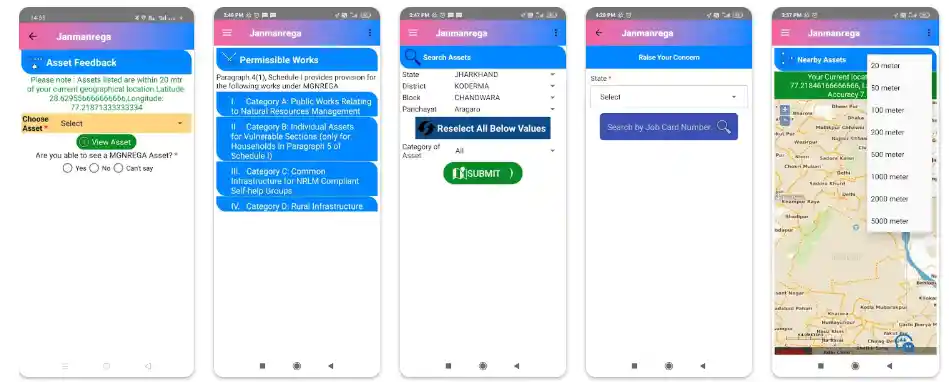
- Locate geotagged MGNREGA assets
- Provide feedback on assets created under the scheme
Some users report technical issues such as network errors or restricted access, which may affect app usage at times.
Latest NREGA Job Card News
- 13 crore active beneficiaries under NREGA (FY 2024–25)
- 60.24 crore person-days generated as of June 4, 2024
- Women participation rate: 58.9%
- 99.9% payments processed through the National Electronic Management System
MGNREGA has increasingly focused on asset creation and sustainable livelihoods, with a major share of works now completed on individual beneficiary land.
Conclusion
The NREGA Job Card list plays a crucial role in ensuring employment security for rural households across India under the Mahatma Gandhi National Rural Employment Guarantee Scheme. Through this card, eligible beneficiaries can access guaranteed wage employment, track work history, and receive payments directly into their linked bank or post office accounts.
With facilities like online job card list checking, payment status tracking, grievance redressal, and wage transparency, the NREGA system has become more accountable and citizen-friendly. Whether applying offline through the Gram Panchayat or checking details online via the official portal, the NREGA Job Card remains a vital document for rural livelihoods and social security.
FAQs – NREGA Job Card List 2026
When was the NREGA scheme started?
The NREGA scheme was started in 2006.
What is the full form of NREGA?
The full form of NREGA is National Rural Employment Guarantee Act. Later, it was renamed Mahatma Gandhi National Rural Employment Guarantee Act (MGNREGA).
How do I check my name in the NREGA job card list 2026?
You can check your name by visiting the official NREGA website and selecting your state, district, block, and panchayat.
How is the NREGA payment made if the beneficiary does not have a bank account?
If the beneficiary does not have a bank account, the payment may be made in cash, as per local arrangements.
When was the first NREGA job card list released?
The first NREGA job card list was released in 1991 by the then Prime Minister P. V. Narasimha Rao.
How can I check my NREGA payment status?
You can check your payment status by visiting the official NREGA website and using your job card details.
Who is eligible to apply for NREGA job card?
All BPL cardholder families and eligible rural households can apply for work under NREGA and obtain a job card.
Is Job Card a list?
No, the NREGA Job Card is a document, not a list. It contains details of adult members enrolled under MGNREGA along with their photographs.
How can I check my job card number?
You can check your job card number by visiting the official website and entering details such as state, district, block, panchayat, village, and family information.
How can I check my NREGA account?
You can check your NREGA account details online using your job card number on the official portal.
What is the mandate of MGNREGA?
The mandate of MGNREGA is to provide at least 100 days of guaranteed wage employment in a financial year to every rural household whose adult members volunteer for unskilled manual work.
What is an NREGA job card?
The NREGA Job Card is an important document that records workers’ entitlements, employment history, and wages under the MGNREGA scheme.
What is the meaning of ‘household’ under MGNREGA?
A household includes family members related by blood, marriage, or adoption, living together and sharing meals or holding a common ration card.
What is the procedure to register for employment under NREGA?
Households must submit an application to the local Gram Panchayat using the prescribed form or plain paper.
What is the frequency of MGNREGA job card registration?
Registration for MGNREGA Job Cards is open throughout the year.
Who can apply for a job card on behalf of a household?
Any adult member (18 years or above) of the household can apply on behalf of the family.
Can all adult members of a household register for a job card?
Yes, all adult members willing to do unskilled manual work can register under MGNREGA.
For how many years is the NREGA job card registration valid?
The registration is valid for five years and can be renewed or revalidated as per the prescribed process.
What is the time limit for issuing NREGA job cards?
Job cards should be issued within 15 days after verification of eligibility.
Is there a provision for issuing a duplicate NREGA job card?
Yes, a duplicate job card can be issued if the original is lost or damaged, upon application to the Gram Panchayat.
Can the NREGA job card be used for other government schemes?
The job card is primarily meant for NREGA employment but may also be accepted as proof of identity or residence for certain schemes.
Is the NREGA job card linked to a bank account?
Yes, the job card is linked to a bank or post office account for direct wage payments.
How are NREGA wages calculated?
Wages are fixed by the Central Government and vary by state. Payments are based on the quantity and quality of work performed.
What are the modes of NREGA payment?
Payments are made directly to bank or post office accounts to ensure transparency.
What should I do if I do not receive my payment on time?
You should first contact local NREGA officials. If unresolved, the issue can be escalated to higher authorities or reported on the NREGA portal.
What documents are required for NREGA payment?
A valid Nrega job card, linked bank or post office account, Aadhaar (where applicable), and recorded work details are required.
Related Sarkari Yojana :
- Atal Pension Yojana 2026
- Ayushman Card Yojana 2026
- Gujarat Voter List 2026 PDF Download
- Sukanya Samriddhi Yojana 2026
- PMAY Gramin Beneficiary List 2026
- Gujarat Voter List 2026 PDF Download
- Odisha Videsh Siksha Bruti Scheme 2026
- Lado Lakshmi Yojana Beneficiary List 2026
- Annadata Sukhibhava Beneficiary List 2026
- Assam Orunodoi 3.0 Beneficiary List 2026